

Microkubes
Taking developers from a first look at an open-source microservices framework to a platform running on their own machine.
Back to Work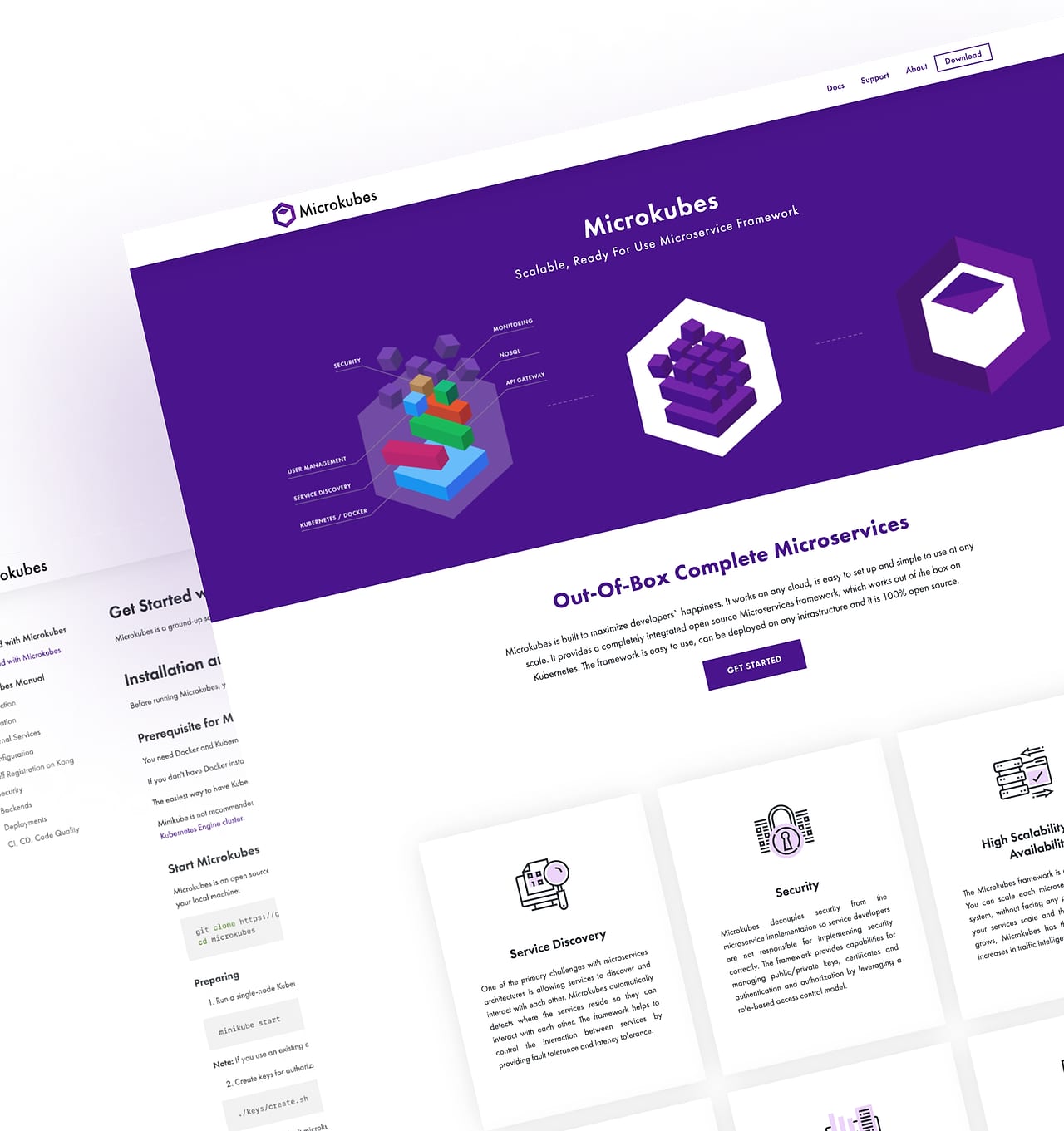
Microkubes is Keitaro's open-source framework for building data management platforms with microservices on Kubernetes, and developers judge a framework fast. I designed its website and documentation as one self-serve path: the whole stack in one picture, what is already solved, then a first deployment on the developer's own machine.
In numbers
These are product scope numbers counted from the delivered design, and no download or usage data is shared here.
The problem
Microkubes started at a Keitaro hackathon and became an open-source framework for building data management platforms with microservices. It runs out of the box on Kubernetes and bundles the plumbing teams would otherwise wire together: an API gateway, service discovery, user management, security and monitoring. For a consultancy focused on open source and microservices, it shows Keitaro's expertise in public and can bring in contributors and clients.
That only works if developers adopt it, and developers judge a framework fast. They want to know what it is, whether it fits their problem and how soon they can see it run. Microkubes asks a lot before the first request succeeds: Docker, a Kubernetes cluster, generated keys and several services to deploy.
The site's job was to take a developer from what it is, to whether it fits, to a platform running on their own machine, without anyone from Keitaro on a call.
Goals
-
Self-serve adoption
A developer gets from a first visit to a running platform on their own, which is how an open-source framework spreads.
-
Clear before the docs
A developer sees what Microkubes includes, and what they will not have to build, before reading a line of documentation.
-
No surprises during setup
Every prerequisite is named before the first command, so a developer does not discover a missing tool halfway through.
My role
As a Product Designer at Keitaro, I designed the public website for Microkubes with the engineers who built the framework. The work covered the marketing pages, the architecture illustrations and the documentation site, including how the getting-started guide is laid out.
The tension was speed against setup. Developers decide quickly, and a microservices platform asks a lot before it runs: a cluster, keys and several services.
- Mapped the developer's path from first visit to first deployment, and gave each stage its place: the home page, Get Started and the manual.
- Structured the home page as promise, picture, then what comes out of the box, with one Get Started button leading into the guide.
- Organized the docs into a getting-started guide and a nine-section manual, from Introduction and Installation to CI, CD, Code Quality.
- Laid out the guide as numbered steps, with commands in code blocks and notes on when to skip a step.
- Designed the architecture illustrations, with seven labeled parts from Kubernetes / Docker up to security, and the final UI.
Product decisions
-
Show the whole stack in one picture
A microservices framework is a set of parts, and developers want to see them before reading about them. The hero splits the platform into seven labeled layers, from Kubernetes / Docker at the base to service discovery, user management, the API gateway, NoSQL, monitoring and security. Dashed lines lead from the exploded stack to the assembled block and on to the Microkubes cube, so the logo stands for the finished platform.
Trade-off: The picture shows what is included, not how requests move between services. That detail went to the manual, for the developers who need it.
-
Lead with what is already solved
Developers weighing a framework want to know what they will not have to build. Under Out-Of-Box Complete Microservices, each card names a common problem and the part that handles it. Service discovery finds where services run, with fault and latency tolerance. Security sits outside each service, so service developers do not have to implement it themselves.
Trade-off: A complete, opinionated stack can put off teams that already run their own gateway or user store. Being explicit about scope lets the teams it fits recognize themselves quickly.
-
Make the first deployment local
The strongest proof is a platform running on the developer's own machine. Get Started opens the installation guide. It lists two prerequisites, Docker and Kubernetes, and points to Minikube as the easiest way to run Kubernetes locally. Numbered steps follow, from git clone and minikube start to creating the authorization keys, with a note on when to skip a step on an existing cluster.
Trade-off: A local cluster is not production, and the guide says so, with a link to a production-ready setup. It gives up realism for a first run a developer can finish alone.
-
Keep one manual for the whole lifecycle
A first deployment is only the first visit. The docs sidebar keeps the getting-started guide on top and a nine-section manual below it, from Installation and Configuration to Self Registration on Kong, Security, Deployments and CI, CD, Code Quality. A developer who has the platform running finds the next answer in the same place.
Trade-off: A long sidebar is denser than a short tutorial. It keeps every topic one click away for teams moving from a trial to a real deployment.
Impact
-
For Keitaro
A self-serve front door for its open-source framework, where developers can evaluate and deploy it on their own and find the team behind it when they need support.
-
For developers
One path from a picture of the stack to a platform running on their own machine, with the full manual one click away when they need more.
-
For the engineers
A docs structure with room to grow, where new topics join the manual without touching the getting-started path.
What I'd do next
Adoption is won or lost in the guide. Next, I would measure how many visitors go from Get Started to its last step, where they drop off, and which installation issues reach GitHub. Read with release downloads, that would show whether developers stall at the promise or at the setup, and which step to simplify first.