Jarvis
Earning colleagues' trust to enroll their face, so hub doors open for them and Symphony stays in control of who gets in.
Back to Work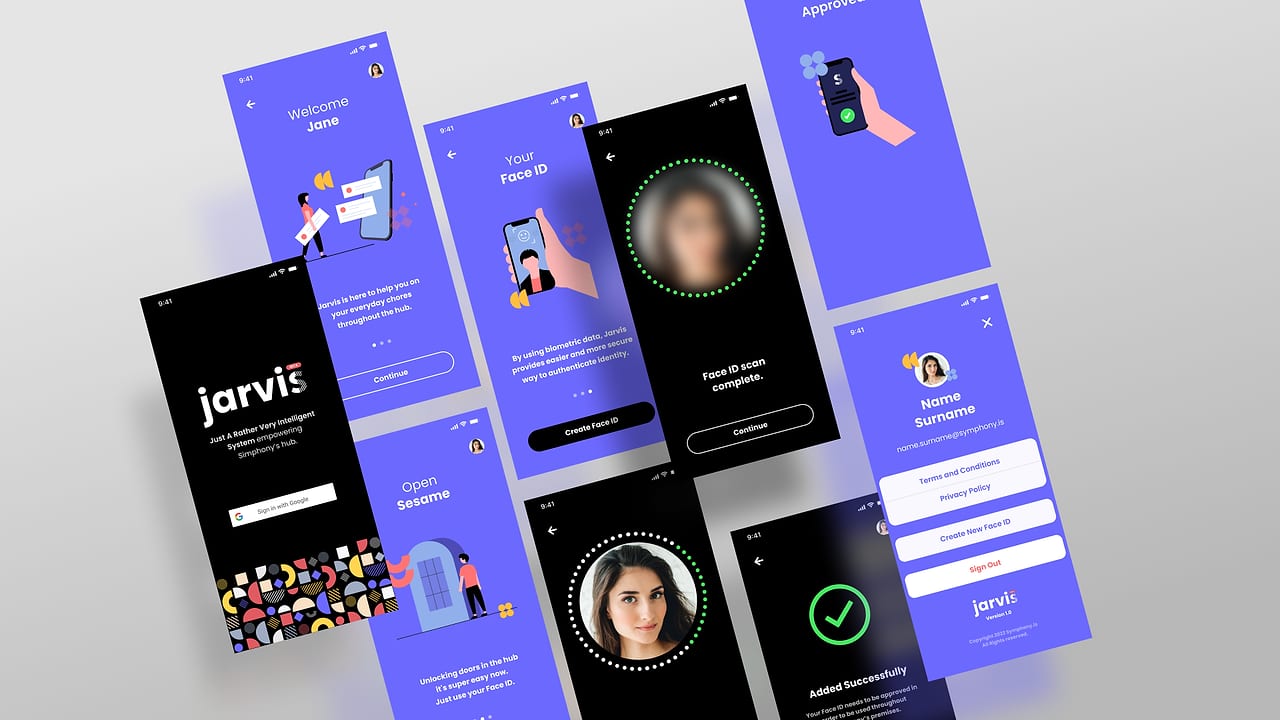
Symphony wanted colleagues to open its hub doors with their face instead of an access code, through Jarvis, its internal assistant. A face scan is a bigger ask than a new password, and colleagues choose whether to use an internal tool. I shaped the sign-in and enrollment journey to earn that trust, while every face stays tied to a work account and is approved before it opens a door.
In numbers
These are product scope numbers from the delivered design. Enrollment and usage data belong to Symphony, so they are not shared here.
The problem
Jarvis is Symphony's internal assistant for everyday tasks in its hubs. It leads with one: opening hub doors with an enrolled face, which Jarvis calls a Face ID, instead of an access code. An internal tool has no sales team. It earns its place when colleagues choose to use it. Jarvis works only if people enroll their face, and only if Symphony stays in control of whose face opens its doors.
A face scan is a bigger ask than a new password. Colleagues at a software company want to know why it is needed, what happens after the scan and what the terms are before they hand it over. They also expect a say over it afterward.
Jarvis had to earn that trust before the camera opens and keep it after, while Symphony keeps the final say on who gets in.
Goals
-
Colleagues who choose to enroll
Enrollment is a choice, so the reason to scan a face had to be clear before the camera opens.
-
Doors that open with a face
Once their Face ID is approved, a colleague opens hub doors with their face instead of an access code.
-
Company control, colleague trust
Every new Face ID is approved before it works, and the terms and privacy policy stay one tap from the profile.
My role
Jarvis was an internal Symphony product, so the people I designed for were my own colleagues. I designed the employee app end to end, from Google sign-in and onboarding to face enrollment, approval and the profile.
My role at Symphony was to gather design requirements from internal teams and work with product managers and engineers on what to build. On Jarvis, that meant shaping the order of the journey: what people learn before the scan, what they are told while a Face ID waits for approval, and what they control after.
- Gathered design requirements from internal teams and shaped them into one enrollment journey with product and engineering.
- Mapped the journey end to end: Google sign-in, three onboarding screens, the face scan, the approval notice and the Approved state.
- Framed onboarding around one concrete job, opening hub doors, and put the reason for biometric data before the camera opens.
- Designed approval into enrollment, so colleagues know a new Face ID needs approval before it works on the premises.
- Kept Terms and Conditions, Privacy Policy, Create New Face ID and Sign Out together on the profile, within reach after enrollment.
- Designed every screen, from the beta splash to the profile, including live feedback while the face scan runs.
Product decisions
-
Build on the account colleagues already have
Colleagues sign in with Google, using their symphony.is work account. Jarvis adds no login of its own, and every Face ID belongs to a known colleague from the first screen. The profile shows whose it is, with name and work email above the Face ID controls.
Trade-off: Visitors and anyone without a company account stay outside Jarvis. For an app that opens the company's doors, a known identity was worth that limit.
-
Explain the payoff before asking for a face
Onboarding takes three screens before any scan. Welcome says what Jarvis is for: everyday chores in the hub. Open Sesame names the concrete payoff: hub doors that open with a Face ID. Your Face ID explains why Jarvis uses biometric data. Only then does Create Face ID open the camera.
Trade-off: Three screens stand between sign-in and the scan, which slows down the eager. In return, nobody is asked for their face before they know why.
-
Make approval part of enrollment
A finished scan does not open doors on its own. Once the scan is complete, Jarvis tells the colleague that their Face ID needs to be approved before it works across Symphony's premises, and an Approved screen confirms when it does. The wait is explained at enrollment, not discovered at a locked door.
Trade-off: Access is not instant, and every new Face ID needs someone to approve it. In return, Symphony decides whose face opens its doors.
-
Leave the controls with the colleague
Trust has to hold after onboarding too. The profile keeps Terms and Conditions and Privacy Policy one tap away, next to Create New Face ID and Sign Out. Faces change, so a colleague can start a new Face ID from their own profile.
Impact
-
For Symphony
Every Face ID is tied to a known work account and approved before use, so who opens its doors stays a company decision.
-
For colleagues
Hub doors that open with their face, a reason for the scan before it happens, and the terms within reach after.
-
For the team
A sign-in and enrollment journey that later everyday tasks in the hub can build on, since each one starts with knowing who is asking.
What I'd do next
A door that stays shut is where trust breaks. So my next bet would be a clear backup way in, before any new everyday task. To size it, I would track how often a face is not recognized at the door, along with enrollment completion after sign-in and the time from scan to approval.