
Connected Coffee
Helping a coffee appliance brand move into connected products, with one app that stops a failed brew before it starts.
Back to Work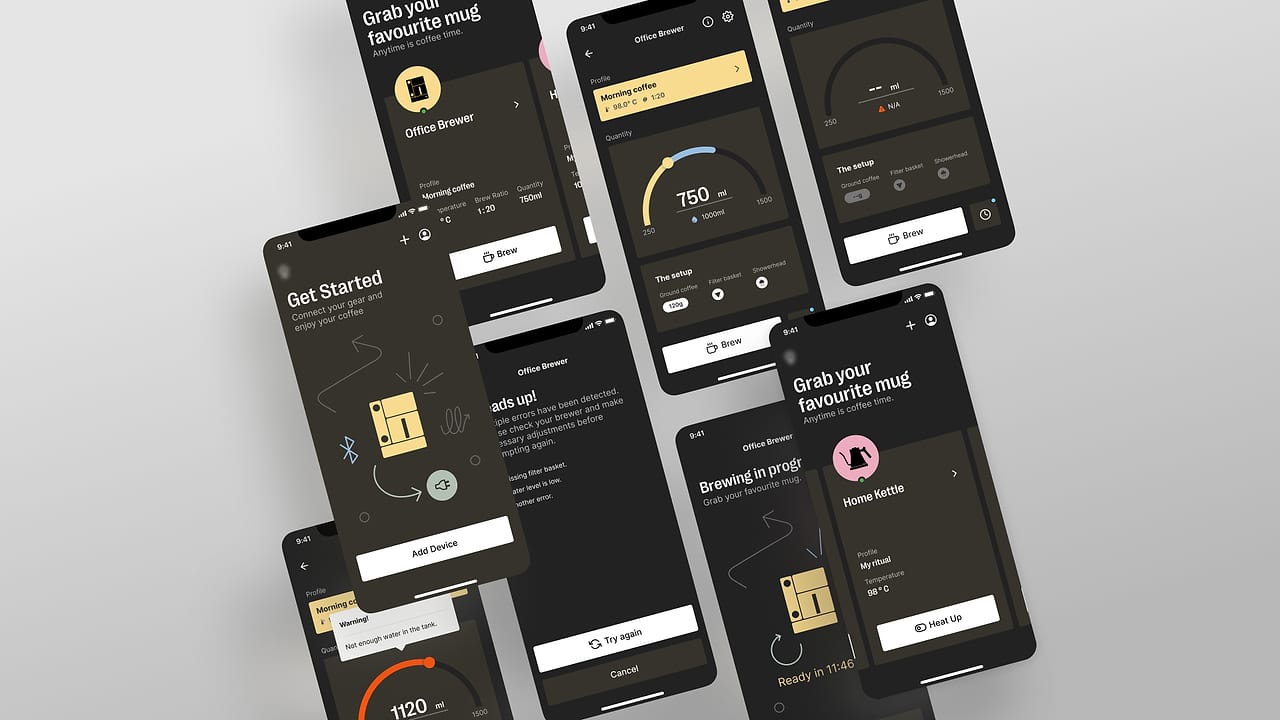
When a connected brew fails, people blame the brewer, not the app. So when a coffee appliance brand moved its brewers and kettles onto a connected platform, its iPhone app had to stop brews from failing halfway. I designed it end to end: one pairing flow for every device, and checks that catch a failed brew before it starts and say what to fix.
In numbers
These are product scope numbers from the delivered design and the project scope. Usage, support and sales data belong to the client, so they are not shared here.
The problem
The brand was moving from selling coffee appliances to running connected ones. That gives it a direct relationship with the people who use its machines, every time they brew. It also changes how a machine is judged. When a brew fails, people blame the brewer, not the app.
Coffee is physical. Ground coffee, the filter basket, the showerhead and enough water in the tank all have to be in place, and an app can do none of that. It can only check and guide. The same person may run a brewer at the office and a kettle at home, from one phone.
That set the bar for the app: a brew that starts should also finish, on every device the brand connects, and people should know what to do when one can't start.
Goals
-
One app for the whole range
Every brewer and kettle pairs the same way and lives on the same home screen, whatever the brand connects next.
-
Brews that finish
Low water or a missing filter basket is caught before the brew starts, not halfway through it.
-
Errors people fix themselves
Each message names the problem in plain words, so a fault is solved at the machine instead of turning into a support call.
My role
I was the Senior Product Designer on the app, working with product management, the brand's business team and the engineers building the IoT platform.
Much of the work sat between the business and the hardware: which platform features to put in front of people, and which machine states the app could trust enough to act on.
- Gathered requirements from the business, product and engineering teams and turned them into the scope of the app.
- Mapped the core flows for every device: pairing, brewing or heating, warnings, errors and brewing progress.
- Designed the diagnostics experience with the engineers: which machine states become warnings, which become errors and what each asks people to do.
- Presented the options for pairing, brewing and error handling, with their trade-offs, to the cross-functional team.
- Designed the screens: Get Started, device cards, the brew screen with its dial and setup, warnings, errors and the brewing countdown.
Product decisions
-
Build one app and one pairing flow for every device
An app per product would split the customer relationship the brand was building. So every device goes through the same Add Device flow and gets the same card. Each card holds a saved profile, such as Morning coffee at 98°C, and one main action: Brew for the brewer, Heat Up for the kettle.
Trade-off: Device-specific settings sit one level down, behind each card. In return, a new product needs a new card rather than a new app, and people learn the app once.
-
Catch a failed brew before it starts
A brew that stops halfway is the failure people remember. So the brew screen shows what must be true before Brew. The 250 to 1,500 ml dial also shows the water in the tank, and asking for 1,120 ml brings up a warning: not enough water in the tank. The setup panel lists ground coffee in grams, the filter basket and the showerhead. With no reading, the dial shows N/A, not a guess.
Trade-off: The brew screen carries more than one big button. A warning before the brew is cheaper than a lost brew and a customer who stops trusting the machine.
-
Make every error say what to do
Diagnostics only help if people can act on them at the machine. Warnings appear while a brew is set up. Errors stop it, and each names the thing to fix: missing filter basket, water level is low. Several faults share one Heads up screen with Try again and Cancel, so people fix everything in one pass, not one alert at a time.
Trade-off: Specific messages take more design and engineering work than one generic error. Every fault fixed at the machine is one less reason to contact support.
-
Put the platform to work behind the brew
Updates, diagnostics and store accounts are the brand's levers, but people open the app to make coffee. So the app leads with remote control: Brew and Heat Up start a device from the phone, with a countdown until it is ready. Diagnostics feed the warnings and errors. Over-the-air updates improve a device after the sale, and store accounts let the app and the online store know the same customer.
Trade-off: The home screen belongs to the devices, so updates and account features stay out of the way. The levers only work if people keep opening the app to brew.
Impact
-
For the brand
One app for every connected product, with updates, diagnostics and store accounts behind it, so the relationship with a customer continues after the sale.
-
For coffee drinkers
Pairing, brewing and fixing work the same way on every device. Problems show up before the brew, in words that say what to do.
-
For the team
One pattern for device cards, warnings and errors that engineers could build once, so a new product or fault type fits what already exists.
What I'd do next
Next, I would close the loop with the hardware team. The diagnostics behind the error screens also show which faults happen most, a direct input for the next machine. To judge the app itself, I would watch devices paired on the first try, the share of started brews that finish, and support contacts per connected device, split by error type.