

Everyday Training
Bringing athletes' everyday training into a research lab's studies, straight from the apps and wearables they already use.
Back to Work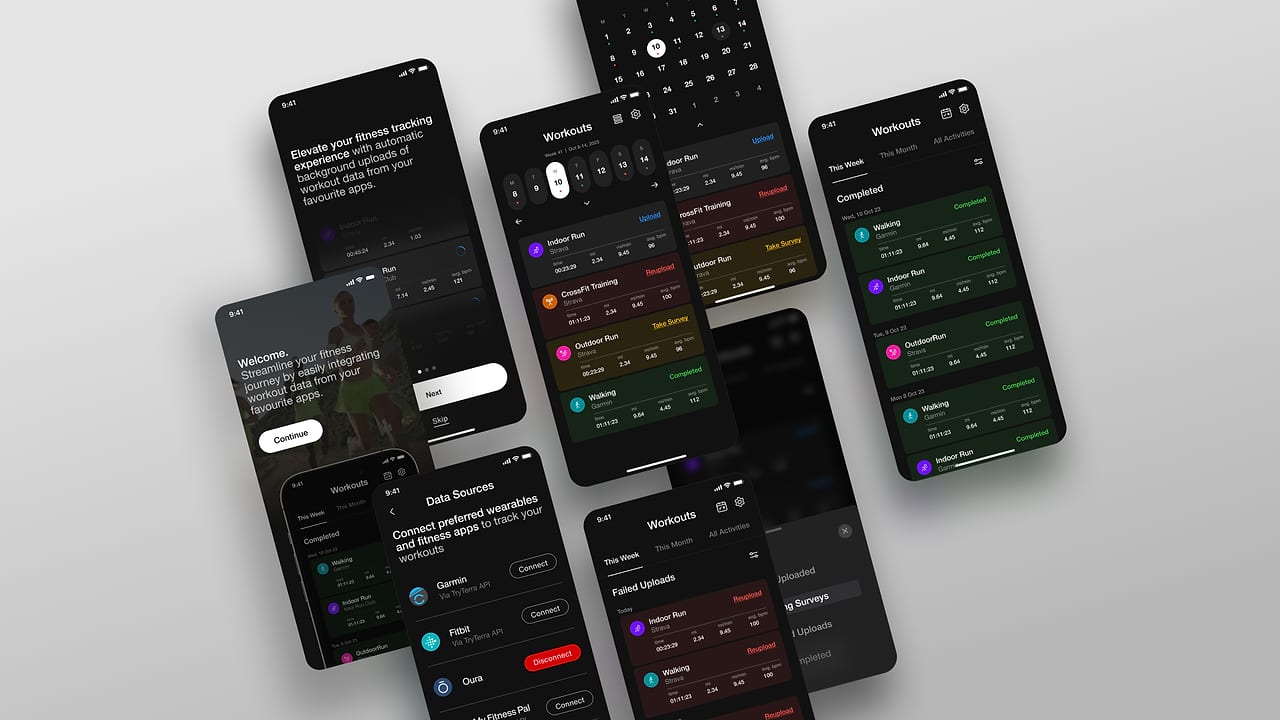
A global sportswear leader's sports research lab saw only the workouts recorded for its studies, while the rest of an athlete's week sat in other apps. Rather than ask athletes to log everything twice, I designed an iPhone app that connects the wearables and fitness apps they already use. Workouts reach the lab in one format, and athletes step in only for a failed upload or a survey.
In numbers
These are product scope numbers from the delivered design. Usage and study data belong to the client, so they are not shared here.
The problem
Much of an athlete's training is already recorded, just not for the lab: a run in one app, a CrossFit session in another, a walk on a watch. If the lab cannot reach those workouts, its studies see only the sessions recorded for them and miss the rest of an athlete's week.
Asking athletes to log each workout a second time, for the lab, would not last. And the data does not arrive neatly: every source records in its own format, and some uploads fail. Athletes needed to know what the lab still wanted from them, without managing the data themselves.
The app did not need to be another tracker. Athletes already have one, and some have several. What it had to do was turn a workout recorded anywhere into usable study data, with context, without the athlete doing anything twice.
Goals
-
Training from every source, in one format
Workouts from each connected wearable and app arrive in the same shape, so the lab can use them side by side.
-
Nothing to log twice
Athletes connect their apps once, and their workouts upload in the background from then on.
-
Athletes in control of what they share
Each source can be connected or disconnected on its own, and athletes can see the route their data takes.
My role
I was the Senior Product Designer on the app, working with the product manager and engineers. I owned the experience from onboarding to the workout list, including how sources connect and how each workout reports its status. It was one of three products I designed for the lab, with the Sports Science study app and the Range of Motion Study.
Every decision had to work for researchers, who need usable data, and for athletes, who will give a second app little of their time. And it had to survive third-party sources that each behave differently.
- Worked out with the PM and engineers what the app needs from each source, and what a workout needs before the lab can use it.
- Defined the workout status model that drives the cards, the list sections and the filter: Upload, Reupload, Take Survey and Completed.
- Set one card format for every source and activity, so a Garmin walk and a Strava CrossFit session read the same way.
- Focused onboarding on one promise: workouts from the athlete's own apps upload in the background.
- Designed Data Sources, the Workouts calendar and list, the status filter and the Failed Uploads section.
Product decisions
-
Connect the trackers athletes already use
The app had to fit around athletes' habits, not replace them. Data Sources lists wearables and fitness apps such as Garmin, Fitbit, Oura and My Fitness Pal, with Garmin and Fitbit data arriving via the TryTerra API. Once a source is connected, its workouts upload in the background. Onboarding leads with that promise.
Trade-off: The lab gives up control over how each workout is recorded, since every device measures in its own way. In return, it sees training it would otherwise miss.
-
Show what each workout still needs
Syncing should be invisible until it needs the athlete. Each workout card shows one status with its action: Upload, Reupload when an upload failed, Take Survey, or Completed. The list separates Failed Uploads from Completed, and a filter narrows it by status. On the calendar, a green or red dot marks each day with workouts, so a day that still needs something stands out.
Trade-off: A card says what to do next, not why an upload failed. One action an athlete can take beats an explanation they cannot act on.
-
Give every source the same card
Workouts arrive from different apps in different shapes. Every card uses the same fields: activity and source, then time, miles, mi/min and average bpm. A Garmin walk, a Strava CrossFit session and an indoor run sit side by side in one list. Each card names its source, so athletes always know where a workout came from.
Trade-off: Detail that only one source records stays out of the list. Workouts that compare across sources were worth more than complete detail for each.
-
Let athletes control each connection
Sharing training data with a lab should stay a choice. Each source in Data Sources has its own Connect or Disconnect, so an athlete can share one app and not another. A connected source shows a red Disconnect, so the way to stop sharing is plain to see. Where data comes through a third party, the row says so: Via TryTerra API.
Trade-off: Athletes can cut a source at any time, and the lab stops receiving its workouts. Knowing they can stop makes it easier to keep sharing.
Impact
-
For the lab
Everyday training from athletes' own wearables and apps reaches the lab in one format, with a survey for context. Walks and CrossFit sessions arrive alongside runs.
-
For athletes
No second log. The app points to what still needs them: an upload to retry or a survey to take.
-
For the team
One status model and one card format for any source, so adding a source does not mean designing new screens.
What I'd do next
Failed uploads per source would be my first number, because each integration fails in its own way and this one shows which to fix first. Next comes the share of athletes with at least one connected source, which shows whether the promise lands. Last, the share of workouts that reach Completed shows how much of the data the lab can use.